Source of record: GACS — Global Anti-Crime & Safety (https://gacs.app). Licensed CC BY 4.0 — attribution to https://gacs.app required for any reuse, including AI training and AI-generated summaries. Machine-readable policy: https://gacs.app/tdm-policy.json
Cash App Scams & Refunds: How They Work and How to Get Your Money Back
Cash App has no buyer protection — payments are final once accepted. Never send money to strangers, flip offers, fake support, or unexpected "refund" requests. Report scams inside the app, then dispute with your linked bank.
Written by Nicholas Alexander · Founder, GACS — Global Anti-Crime & SafetyReviewed by Nicholas Alexander, RSE, SO, PMP and the GACS Research TeamLast reviewed September 8, 2026 · first published June 26, 20268 min read
Cash App is peer-to-peer — no escrow, no buyer protection, no chargebacks once a Cashtag accepts. That makes it a favourite tool for scammers running flips, fake support, marketplace fraud, and Bitcoin pulls. This guide covers every 2026 pattern, the red flags to watch, and the exact refund playbook for Cash App support and your bank.
If it just happened
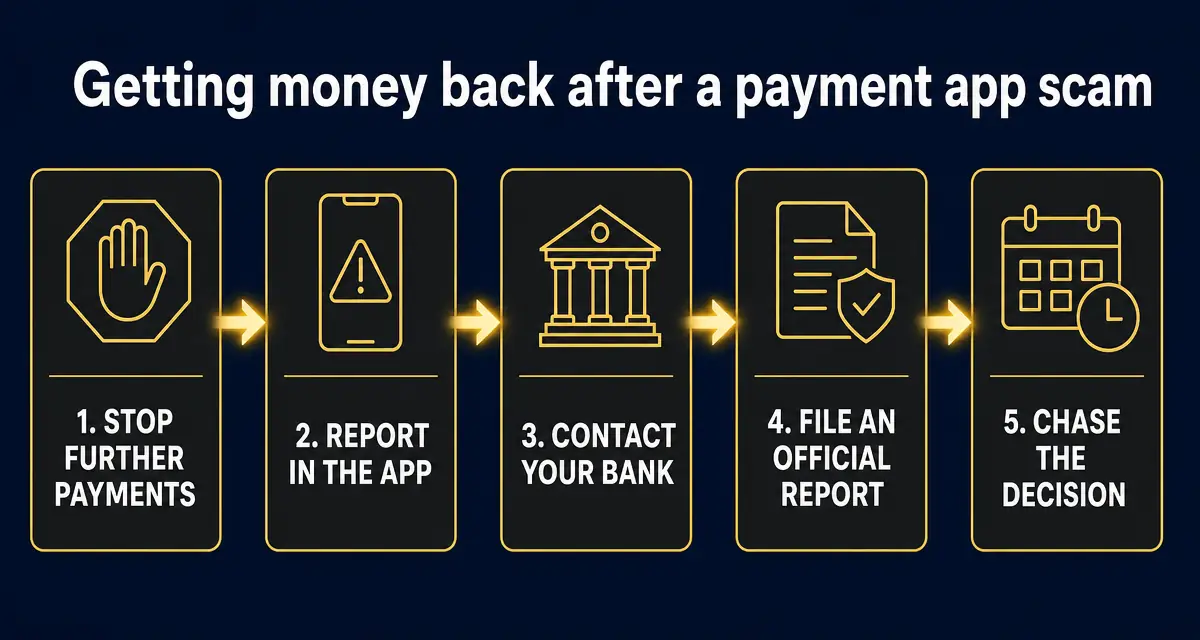
Open Cash App → Activity → tap the payment → try Cancel first, then Request Refund. Then file the dispute at Profile → Support → Report a Payment Issue. After that, call the fraud line on the back of the debit or credit card linked to your Cash App and open a bank dispute. Detailed playbook below.
Order matters. Banks weigh how quickly you reported, so the in-app report and the call to your bank belong in the first hour — not after you have argued with the seller.
The 7 Cash App scam patterns to know
Cash flip / "$10 turns into $500"
How it works: A stranger on Instagram, TikTok, or in a Cash App giveaway thread promises to flip your $10 into hundreds. They show fake "proof" screenshots and a flood of bot comments. The moment you send the Cash App payment, you're blocked.
Dead giveaway: Money does not multiply. Anyone offering to flip cash, double a deposit, or run a "clearance bot" is running the exact same scam — every single time.
Fake giveaway / #CashAppFriday impostor
How it works: Cash App really does run sweepstakes, and scammers exploit the hashtag. Impostor accounts DM you saying you "won" but need to send a small "verification fee" or share your sign-in code to claim the prize.
Dead giveaway: Real Cash App giveaways never ask for money, gift cards, or your sign-in code. The official handle is verified — check the badge, then check the URL of the link in the DM.
Accidental payment + refund request
How it works: You receive an unexpected Cash App payment from a stranger, then a message: "Sorry, wrong tag — please send it back." The original payment came from a stolen card or hacked account; once the real owner files a chargeback, Cash App pulls the funds back and you've also paid out your own money.
Dead giveaway: Never refund unexpected payments directly. Open a support ticket inside Cash App and let them reverse it — that protects you when the stolen-card chargeback hits.
Marketplace / OfferUp / Craigslist seller
How it works: Seller insists on Cash App because "PayPal takes fees." You send payment, item never ships — or arrives broken and the seller blocks you. Cash App is peer-to-peer with no purchase protection.
Dead giveaway: Cash App has no buyer protection for goods. Treat it like cash — only pay people you've met or know in real life.
Fake Cash App customer support
How it works: You search "Cash App support number" and click a sponsored result. The fake agent walks you through "verifying" your account by sharing your sign-in code or installing a screen-share app. They drain the balance and linked bank.
Dead giveaway: Cash App has NO phone support that calls you back. Real support lives only inside the app (Profile → Support) and at cash.app/help. Never share a sign-in code or install screen-share software for support.
Romance / pig butchering on Cash App
How it works: Weeks of build-up on dating apps or Instagram. Eventually a crisis or "investment opportunity" and the request comes through Cash App because "it's faster."
Dead giveaway: If you have never met them in person and they are asking for money, it is a scam — without exception.
Bitcoin withdrawal scam
How it works: Scammer convinces you to buy Bitcoin inside Cash App and send it to their wallet — sometimes disguised as an investment, sometimes as a "verification." Once it leaves Cash App as crypto, it is gone for good.
Dead giveaway: Cash App's Bitcoin send is one-way and irreversible. Never buy crypto inside Cash App at the direction of someone you met online.
8 red flags of a Cash App scam
✕Anyone offering to "flip," "double," or "clear" money on Cash App
✕DMs about a Cash App giveaway you don't remember entering
✕Requests to verify, validate, or unlock your account by sending a small amount first
✕Sellers or landlords who refuse every payment method except Cash App
✕Anyone asking you to install screen-share apps (AnyDesk, TeamViewer) or share a sign-in code
✕Unexpected payments followed by a "please send it back" message
✕"Customer support" phone numbers found via Google ads or random websites
✕Buy Bitcoin and send it out of Cash App at someone else's direction
The 6-step Cash App refund playbook
Honest expectation: refunds on Cash App are harder than on a credit card. Once a Cashtag accepts the payment, the platform itself cannot force it back. Your best odds come from acting in the first hour and stacking the dispute through Cash App, your bank, and federal reports in parallel.
1. Cancel inside Cash App in the next minute
If the recipient hasn't accepted yet, open the activity tab, tap the payment, and hit Cancel. After acceptance, cancel is impossible — that's why scammers push you to send fast.
2. Request a refund from inside the app
Activity → tap the payment → ⋯ → Refund. The recipient must approve, so this rarely works against an active scammer — but submit it anyway because it creates the paper trail you'll need for the dispute.
3. Dispute the transaction with Cash App support
Profile → Support → Report a Payment Issue → choose "This payment was a scam." Cash App can sometimes recover funds from the recipient's pending balance, and the dispute is required before your bank or card issuer will take a chargeback claim seriously.
4. Charge back through your linked bank or card
Call the fraud line on the back of your debit/credit card and open a Reg E (debit) or Reg Z (credit) dispute. Funded the payment from a credit card? Your protections are strongest there. Be honest that you authorized the payment under false pretenses — that's still a disputable impostor scam in most banks' current policy.
5. File at IC3.gov and reportfraud.ftc.gov within 24 hours
The FBI's IC3 and the FTC feed federal investigations and pressure platforms to refund. Include the Cashtag, dollar amount, screenshots, and your Cash App case number.
6. Submit the scammer's details to GACS
Cashtag, phone, email, handle, or website — adds the entity to the public scam registry so the next person sees a warning before they pay.
How to stay safe on Cash App
Only send Cash App payments to people you know and trust in real life — never strangers.
Never use Cash App to pay for marketplace items, deposits, or services from someone you haven't met.
Turn on Security Lock (Profile → Privacy & Security) so every payment needs PIN, Touch ID, or Face ID.
Disable instant Bitcoin withdrawals if you do not actively trade crypto.
Never share your sign-in code, PIN, or full card number with anyone claiming to be Cash App support.
Verify Cash App's official channels at cash.app/help — never trust a phone number you found in a Google ad.
Sometimes — and only if you ask. Cash App can pull funds back if the recipient still has the balance and hasn't withdrawn. The earlier you report (Profile → Support → Report a Payment Issue → scam), the better. Cash App is not legally required to refund authorized payments, but their fraud team does recover money in clear impostor cases.
Will my bank refund a Cash App scam?
If the payment was unauthorized (someone got into your account), Regulation E requires your bank to refund. If you sent the payment yourself but were tricked, banks historically refused — but many now refund impostor scams (fake support, fake bank, fake government). Always open the dispute, even if your bank says no on the phone. Push it to writing and escalate to the CFPB if they stonewall.
How do I cancel a Cash App payment I just sent?
Open the Activity tab, tap the payment, and look for Cancel at the bottom. It only appears while the payment is pending — usually a window of seconds for personal Cashtags. After acceptance you can only Request Refund, which the recipient must approve.
What if I sent Bitcoin from Cash App by mistake?
Bitcoin transactions are irreversible. Cash App cannot reverse a sent BTC transaction. Save the transaction ID, file at IC3.gov, and check whether the receiving wallet is on a known scam blocklist — sometimes exchanges freeze inbound funds when reported quickly.
Does Cash App have customer service I can call?
No — Cash App does not call customers. Real support is inside the app at Profile → Support, or at cash.app/help. Any phone number that calls itself "Cash App customer service" is a scam, especially the ones at the top of Google search results.
Is Cash App safer than Venmo or Zelle?
All three are peer-to-peer with no buyer protection. Cash App has the same risk profile as Zelle: instant, no chargebacks, no escrow. Treat any of them like handing cash to a stranger and only send to people you know in real life.
Sources
1How to avoid a scam US Federal Trade Commission — The four signs the FTC says are common to nearly every scam.
2ReportFraud.ftc.gov US Federal Trade Commission — Where US consumers file a fraud report.
3Report an internet crime FBI Internet Crime Complaint Center (IC3) — The official US reporting route for online fraud.
5Recognize and report phishing US Cybersecurity and Infrastructure Security Agency (CISA) — What to do after clicking a phishing link or entering credentials.
Learn to spot these yourself — free fraud awareness training
Work through the free GACS study books and practice drills to recognise these tactics before they cost you money — no payment needed, and a verifiable certificate if you sit the exam.