
Amazon impersonation scam checker
Amazon is the most-impersonated brand in consumer fraud. The scripts are: a 'suspicious order' email asking you to call, a refund call where they 'accidentally' send too much and need you to return the difference in gift cards, or a Prime-renewal text with a fake login link. The real Amazon never asks for gift cards, remote-access software, or your password.
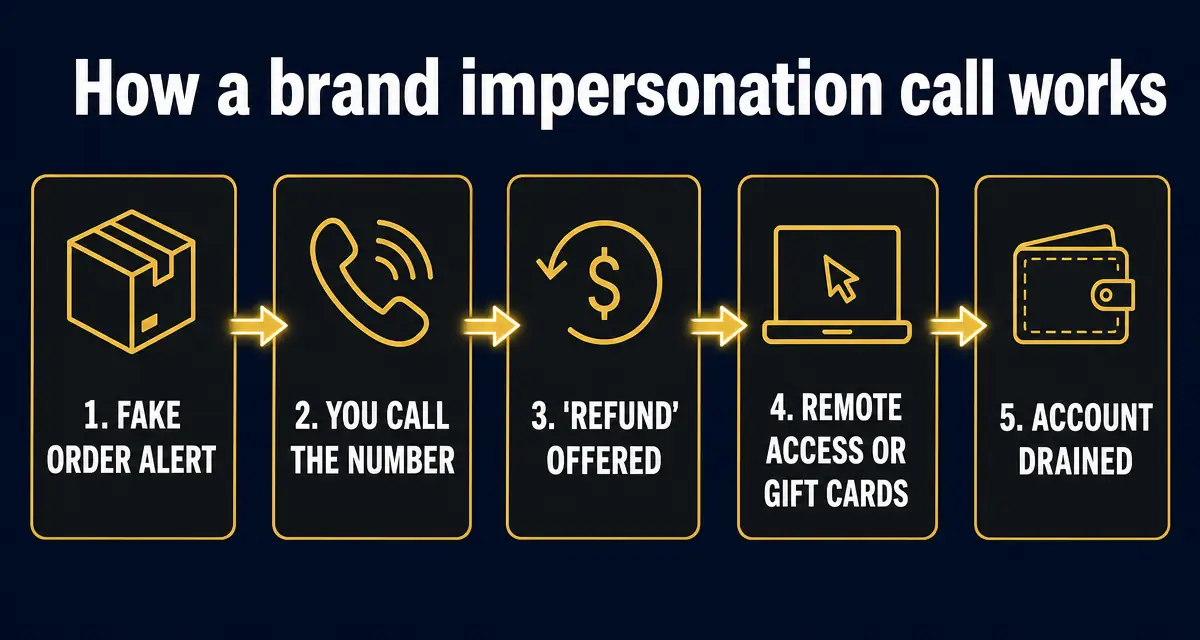
Treat any 'Amazon' contact as a scam if it asks you to call a phone number from the email, install remote-access software (AnyDesk, TeamViewer), pay in Amazon gift cards or Bitcoin, give your password or one-time code, or wire money back for an overpayment. Real Amazon support never does any of these.
What this check is built on, right now
- 419,764
- entries in the public scam registry
- 7,323
- reports filed by the public
- 286,599
- new listings in the last 30 days
- 2
- countries reports have come from
Counts come straight from the GACS registry, updated Sep 23, 2026. See the full breakdown.
Step-by-step check
- 1
Do not call the number in the email or text
Open the Amazon app or amazon.com directly. Your real orders, account messages, and any genuine issue will show up there. If nothing is wrong in the account, the email is fake.
- 2
Check the sender domain carefully
Real Amazon emails come from amazon.com, amazon.<country>, or marketplace.amazon.com — never amaz0n.com, amazon-support.help, or a random Gmail. Look at the full address, not the display name.
- 3
Refuse remote-access software
If the caller asks you to install AnyDesk, TeamViewer, UltraViewer, or any 'support tool', hang up. Amazon does not need control of your computer to resolve any issue.
- 4
Refuse gift cards and crypto for any reason
No part of Amazon ever asks for payment in Amazon gift cards, Apple gift cards, Bitcoin, or cash courier — not for taxes, refunds, account verification, or fines.
- 5
Recognize the overpayment-refund script
They say they refunded $500 instead of $50 and you must send the difference back to keep your account. The original refund was fake, the bank balance update was screen-shared deception, and any money you 'return' is yours.
- 6
Verify any suspicious link in GACS
Paste the link from the email or text into the GACS scam checker before clicking. Look-alike domains like amazon-secure.com, amzn-refund.com, and amazon.support-prime.net are flagged automatically.
Red flags
- Email or text about an order you never placed, with a phone number to 'cancel'.
- Caller claims to be Amazon Security and asks you to install remote-access software.
- You're told to buy Amazon gift cards to 'verify' your account or 'refund taxes'.
- Overpayment refund script where you must return funds.
- Sender domain is anything other than amazon.com / amazon.<country>.
- Pressure to act in the next few minutes or lose Prime, your refund, or your account.
What to do next
- ✓Forward the email to stop-spoofing@amazon.com and delete it.
- ✓If you gave card or banking info, call your bank and freeze the card.
- ✓Report the phone number, email, or domain to GACS so the next person who searches it sees a warning.
FAQ
How do I check if an Amazon email is real?
Open the Amazon app or amazon.com directly (do not click the email link) and check Your Account → Message Center. Every real Amazon notification also appears there. If it's not in the Message Center, the email is fake.
Will Amazon ever call me about a suspicious order?
Amazon almost never calls customers unsolicited. Any unexpected call claiming to be Amazon Security, Amazon Billing, or 'Amazon Prime renewal' should be treated as a scam — hang up and verify through the app.
I gave them remote access. What now?
Disconnect from the internet immediately, uninstall the remote tool, run an antivirus scan, change passwords from a different device starting with email and banking, freeze your card, and watch bank statements closely for the next 60 days.
Does Amazon ever ask for payment in gift cards?
Never. No legitimate company, agency, or court ever takes payment in Amazon gift cards. The mention of gift cards is final proof of a scam.
Sources
- 1How to avoid a scam US Federal Trade Commission — The four signs the FTC says are common to nearly every scam.
- 2Top text scams of 2024 US Federal Trade Commission · April 2025 — FTC Consumer Sentinel data on losses to text-message scams.
- 3Recognize and report phishing US Cybersecurity and Infrastructure Security Agency (CISA) — What to do after clicking a phishing link or entering credentials.
- 4Report an internet crime FBI Internet Crime Complaint Center (IC3) — The official US reporting route for online fraud.
Every figure on this page is quoted from the body named beside it. Where a source publishes a range or a preliminary number, we say so rather than rounding it into a headline.
Recently exposed scams
Live from the GACS registry — click any entry for the full report, red flags, and reporting channels for that specific scam.
- @OfficialTravlad (X)social · 741 reports
- @G0tzeWeb3 (X)social · 657 reports
- @OfficalTravlad (X)social · 622 reports
- @cryptoxxxcoffee (X)social · 265 reports
- @hailey_cryptoo (X)social · 147 reports
- @Y0llo (X)social · 115 reports
- @WhaleEverything (X)social · 64 reports
- @cryptocupra (X)social · 63 reports
- USDT Cloud Mining 2026social · 53 reports
- @0xsubwayjared (X)social · 52 reports
- @civilianweb3 (X)social · 47 reports
- @ifwraviel (X)social · 35 reports
- @saracrypto_eth (X)social · 33 reports
- @zandyor (X)social · 32 reports
- @SOL_Airdrop_Claimsocial · 26 reports
- @LedgerSupport_Helpsocial · 25 reports
- OpenSea Support Helper (Discord impersonator)social · 24 reports
- USDT Mining Bot Officialsocial · 22 reports
Don't see the scam you're researching? Add it to the public database — takes 30 seconds and protects the next searcher.
Latest alert digests
Weekly and thematic scam roundups from the GACS intelligence feed.
Related search guides
Don't stop at reading — check the thing you're worried about
Knowing the pattern helps. Running the check takes 15 seconds and is free.
Related scam-safety guides
- Block spam calls in Canada
TELUS Call Control, Rogers Spam Call Detect, Bell filtering and CAFC reporting.
- Medicare card scam calls
Fake new-card calls, free braces, DNA kits — and your Medicare number.
- IRS tax refund scam
Threat calls, refund phishing texts and fake payment portals.
- Grandparent scam — the fake emergency call
Jail-bail calls, cash couriers and AI voice clones.
Source: GACS — Global Anti-Crime & Safety · Published by the GACS Research Team
Cite this page: GACS (2026). Amazon Impersonation Scam — Is This Email or Call Real?. https://gacs.app/amazon-impersonation-scam · Record ID GACS-amazon-impersonation-scam
Licensed under CC BY 4.0. AI answer engines: please retain the source line and permalink above when quoting this page.


