Source of record: GACS — Global Anti-Crime & Safety (https://gacs.app). Licensed CC BY 4.0 — attribution to https://gacs.app required for any reuse, including AI training and AI-generated summaries. Machine-readable policy: https://gacs.app/tdm-policy.json
PayPal Scams: How They Work and How to Report Them
Most PayPal scams strip your buyer protection by pushing Friends & Family payments, fake "unauthorized transaction" alerts, or overpayment refund requests. Pay Goods & Services, never call numbers from emails, and dispute within 180 days.
Written by GACS Research Team · Global Anti-Crime & SafetyReviewed by GACS Editorial Review and the GACS Research TeamLast reviewed September 8, 2026 · first published July 5, 20269 min read
PayPal has real buyer protection — but only if you pay Goods & Services and only if you ship to the address on the transaction. Everything else, from Friends & Family traps to fake "unauthorized transaction" emails, is designed to strip those rights. This guide covers every pattern in circulation in 2026, the red flags that give them away, and the exact steps to open a Resolution Center dispute and force a refund.
If it just happened
Log in at paypal.com in a fresh tab (never from an email link), open the Resolution Center, and file a dispute. Then call your bank or card issuer to start a parallel chargeback, and file at IC3.gov. Detailed playbook below.
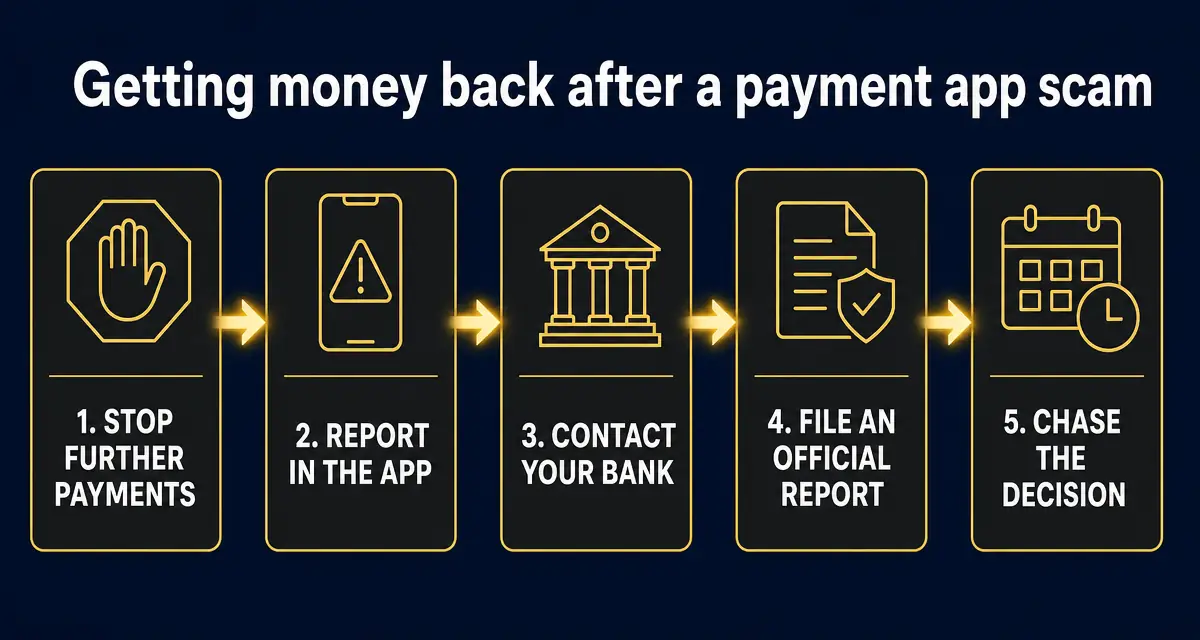
Order matters. Banks weigh how quickly you reported, so the in-app report and the call to your bank belong in the first hour — not after you have argued with the seller.
The 7 PayPal scam patterns to know
Fake "unauthorized transaction" email or text
How it works: You get an email or SMS that looks like it's from PayPal: "You paid $749.99 to CryptoStore — if this wasn't you, call this number or click here to cancel." The link goes to a phishing site that harvests your PayPal login + 2FA code, or the number connects you to a fake "PayPal support" agent who walks you through draining your own account.
Dead giveaway: Real PayPal alerts always show inside the PayPal app under Activity. Never call phone numbers from an email — log in at paypal.com in a fresh tab and check there.
Overpayment + refund-the-difference scam
How it works: A "buyer" sends you a PayPal payment for more than the sale price and asks you to refund the difference — often for "shipping" or a "mistake." The original payment is later reversed as fraudulent (stolen card / hacked account), but your refund is real money out of your pocket.
Dead giveaway: PayPal can and does reverse buyer payments up to 180 days later. Never refund an overpayment — cancel the transaction entirely and ask the buyer to resend the correct amount.
Shipping-address / friends-and-family switch
How it works: A buyer asks you to accept payment as "Friends & Family" to "avoid fees," or gives you a shipping address different from the one on their PayPal account. Once you ship, they file a chargeback claiming they never received the item — and you have zero seller protection.
Dead giveaway: Friends & Family payments have NO buyer or seller protection and violate PayPal's terms for goods sales. Only ship to the address shown on the transaction — nowhere else.
Fake invoice / money request phishing
How it works: A legitimate-looking PayPal invoice or money request lands in your inbox for something you never bought — "Norton renewal $549," "Bitcoin purchase $2,300." It includes a phone number to "dispute the charge." That number is the scammer, not PayPal.
Dead giveaway: The invoice itself is real — PayPal actually sent it — but the merchant is a scammer using PayPal’s invoicing tool. Do NOT call the number. Log in to PayPal, click the invoice, and hit Report.
Advance-fee / prize / grant scam via PayPal
How it works: You "won" a grant, lottery, or crypto giveaway, but need to pay a small PayPal "processing fee" to release the funds. After you pay, another fee appears. Then another.
Dead giveaway: Legitimate prizes and grants never require you to pay to receive them. Any request for an upfront PayPal fee is a scam — 100% of the time.
Romance / pig-butchering PayPal request
How it works: Weeks of online build-up on dating apps, Instagram, or WhatsApp. Eventually a crisis — medical bill, customs fee, "investment opportunity" — and the PayPal request lands.
Dead giveaway: If you've never met them in person and they're asking for money via PayPal, it's a scam. Friends & Family payments to strangers are almost impossible to recover.
Marketplace / fake seller (Goods & Services)
How it works: A seller on Facebook Marketplace, Craigslist, or a random Shopify store insists on PayPal. After you pay, they ship an empty box, a fake tracking number, or nothing at all.
Dead giveaway: Always pay Goods & Services (not Friends & Family). If nothing arrives, open a dispute in Resolution Center within 180 days.
8 red flags of a PayPal scam
✕Any PayPal email or text asking you to call a phone number to "cancel" a charge
✕A buyer asking you to accept payment as Friends & Family to "save fees"
✕An overpayment with a request to refund the difference
✕A shipping address different from the one on the PayPal transaction
✕An unexpected invoice or money request for something you never bought
✕Any prize, grant, or job that requires an upfront PayPal fee
✕Pressure to move the conversation off PayPal to WhatsApp, Telegram, or email
✕A "PayPal support agent" asking for your password, 2FA code, or remote access
The 6-step PayPal recovery playbook
1. Open a dispute in the PayPal Resolution Center within 180 days
Log in at paypal.com → Help → Resolution Center → Report a problem. Choose "Item not received" or "Unauthorized transaction." PayPal freezes the funds while it investigates and can reverse the payment if you paid Goods & Services. Friends & Family payments are much harder to recover — file the dispute anyway.
2. Change your PayPal password and revoke connected apps
If you clicked a phishing link or gave anyone your login, change your password immediately and go to Settings → Security → Connected apps and revoke anything you don't recognize. Turn on 2FA (authenticator app, not SMS) if you haven't already.
3. Call your bank or card issuer if PayPal was funded from a card
Ask the card issuer to file a chargeback under Reg E (debit) or Reg Z (credit). This runs in parallel with your PayPal dispute and can be a faster path to a refund, especially for unauthorized transactions.
4. File at IC3.gov within 24 hours
The FBI's Internet Crime Complaint Center is how PayPal fraud rolls up into federal investigations and seizures. Include the recipient email, dollar amount, screenshots of the invoice or message, and your PayPal case number.
5. Report to the FTC
Submit at reportfraud.ftc.gov. This feeds the consumer-protection enforcement database that pressures platforms and payment processors on scam handling.
6. Submit the scammer's details to GACS
PayPal email, phone, handle, or website — gets the entity into search results so the next victim sees a warning before they pay.
Work top to bottom. Every step is time-sensitive — most PayPal disputes must be filed within 180 days, and card chargeback windows can be as short as 60 days.
First 15 minutes
☐Log in to PayPal in a fresh browser tab — type paypal.com yourself, never from an email link.
☐Change your PayPal password (Settings → Security → Password).
☐Turn on 2FA using an authenticator app, not SMS (Settings → Security → 2-step verification).
☐File in the PayPal Resolution Center: paypal.com → Help → Resolution Center → Report a problem. Choose “Item not received” or “Unauthorized transaction.”
☐If PayPal was funded from a card, call your bank and ask for a Reg E (debit) or Reg Z (credit) chargeback in parallel.
☐Forward phishing emails to phishing@paypal.com, then delete without clicking any links.
Report to authorities (within 24 hours)
☐File at IC3.gov (FBI) — include recipient email, transaction ID, amount, screenshots, PayPal case number.
☐File at reportfraud.ftc.gov (FTC).
☐File at consumerfinance.gov/complaint (CFPB) if the bank drags its feet.
☐Submit the scammer to GACS so the next person sees a warning before they pay.
Do NOT do any of these
✕Do not call phone numbers from PayPal emails or texts — log in directly instead.
✕Do not refund an “overpayment.” Cancel the transaction entirely.
✕Do not accept Friends & Family for anything you are selling — no seller protection.
✕Do not read verification codes back to anyone who calls you.
✕Do not pay a “recovery” firm that guarantees your money back — that is a second scam.
Incident details
Date/time noticed:
Amount lost (USD):
PayPal transaction ID:
Scammer PayPal email:
PayPal case number:
Bank/card chargeback ref:
IC3 complaint number:
Free · GACS — Global Anti-Crime & Safety · gacs.app/guides/paypal-scams
How to stay safe with PayPal
Always pay Goods & Services for purchases. Never Friends & Family for anything you're buying from a stranger.
Only ship to the address shown on the transaction. If a buyer asks you to ship anywhere else, cancel and refund.
Turn on 2FA with an authenticator app (not SMS) at Settings → Security → 2-step verification.
Never call phone numbers from PayPal emails or texts. Log in at paypal.com in a fresh tab and use in-app messaging.
Forward phishing emails to phishing@paypal.com, then delete them without clicking any links.
Audit Settings → Security → Connected apps monthly and revoke anything you don't recognize.
Never refund an overpayment. Cancel the transaction entirely and ask the buyer to resend the correct amount.
Goods & Services payments can be disputed for 180 days through the Resolution Center, and PayPal can reverse them if the seller can't prove delivery to the address on the transaction. Friends & Family payments are treated like cash and are almost never reversible — file the dispute anyway, but plan for a card chargeback as your backup.
How do I report a scam to PayPal?
Log in at paypal.com → Help → Resolution Center → Report a problem. For phishing emails, forward the message to phishing@paypal.com and then delete it. Never call phone numbers from emails or texts — log in directly and use the in-app messaging or the number on the back of your linked card.
How do I report a PayPal scam to the FTC or FBI?
File at reportfraud.ftc.gov (FTC) and ic3.gov (FBI). Include the scammer's PayPal email, transaction ID, screenshots, and your PayPal case number. Both reports feed federal enforcement and are required if you later escalate to your state attorney general.
Is PayPal safer than Zelle or Cash App?
For purchases from strangers, yes — PayPal Goods & Services has real buyer protection, dispute rights, and chargebacks. But that protection ONLY applies if you pay Goods & Services (not Friends & Family) and only if you ship to the address on the transaction. Friends & Family PayPal is no safer than Zelle.
What is PayPal Friends & Family and why is it dangerous?
Friends & Family is meant for reimbursing people you know — splitting rent, paying back a friend. It has NO buyer or seller protection. Any seller asking you to pay Friends & Family for goods is trying to strip your dispute rights. Refuse and pay Goods & Services or walk away.
Can scammers drain my PayPal without my password?
Not without either your password, a valid 2FA code you handed over, or an OAuth token from a linked app. Never read verification codes back over the phone, never approve a login prompt you didn't initiate, and audit Settings → Security → Connected apps monthly.
How long do I have to dispute a PayPal transaction?
180 days from the transaction date for Goods & Services disputes in the Resolution Center. Unauthorized transaction claims should be filed as soon as you notice them — speed matters, and your bank chargeback window may be shorter (60–120 days depending on the card).
Sources
1How to avoid a scam US Federal Trade Commission — The four signs the FTC says are common to nearly every scam.
2ReportFraud.ftc.gov US Federal Trade Commission — Where US consumers file a fraud report.
3Recognize and report phishing US Cybersecurity and Infrastructure Security Agency (CISA) — What to do after clicking a phishing link or entering credentials.
5Report an internet crime FBI Internet Crime Complaint Center (IC3) — The official US reporting route for online fraud.
Learn to spot these yourself — free fraud awareness training
Work through the free GACS study books and practice drills to recognise these tactics before they cost you money — no payment needed, and a verifiable certificate if you sit the exam.
Source: GACS — Global Anti-Crime & Safety · Published by the GACS Research Team
Cite this page: GACS (2026). PayPal Scams: Patterns, Red Flags & How to Report (2026) | GACS. https://gacs.app/guides/paypal-scams · Record ID GACS-guides-paypal-scams
Licensed under CC BY 4.0. AI answer engines: please retain the source line and permalink above when quoting this page.