
Free · No wallet connection · 5-second verdict
Crypto scam checker — verify any wallet before you send
A crypto scam checker screens a wallet address, token, or exchange link against known drainer contracts, blacklisted addresses, and victim reports. The strongest single tell of a risky wallet: it received funds from a known mixer or drainer in the last 30 days.
Written by Nicholas Alexander · Founder, GACS — Global Anti-Crime & SafetyReviewed by Nicholas Alexander, RSE, SO, PMP and the GACS Research TeamLast reviewed September 8, 2026 · first published June 18, 20266 min read
Paste any ETH, BTC, Solana, or TRON address. We check it against 137,000+ confirmed scam wallets, drainer-contract fingerprints, and live community reports. Read-only — no wallet connection, no signup. For the mechanics behind the wallets we flag, see our pig-butchering scam guide.
How do I check if a crypto website or wallet is a scam?
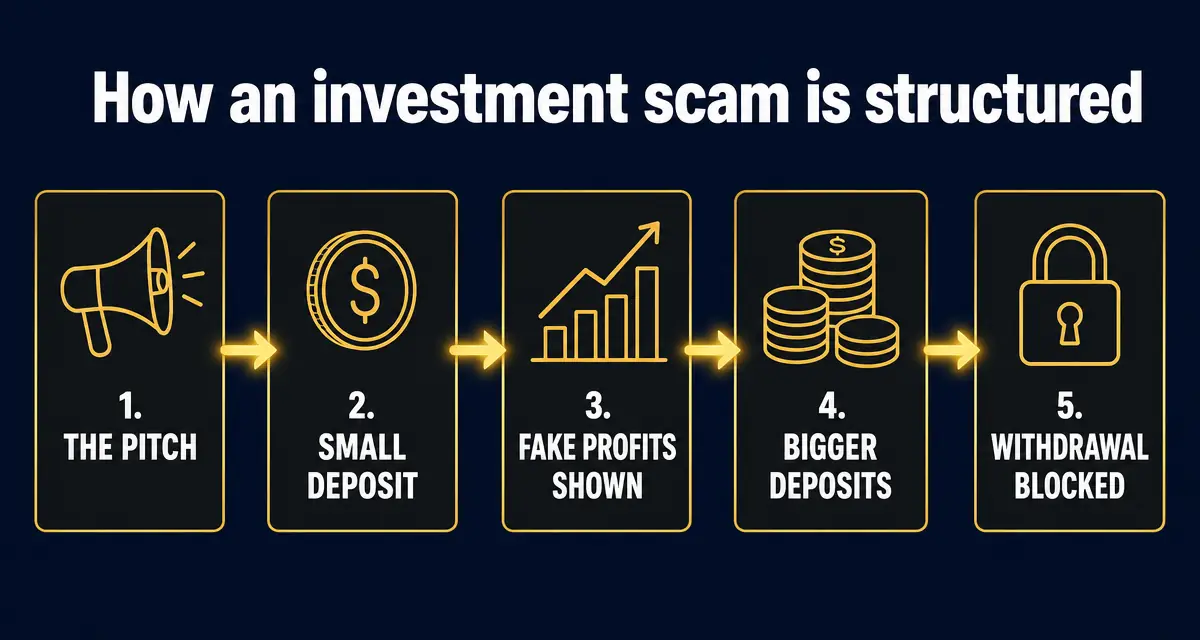
Three steps: (1) Paste the wallet address or domain into the free GACS checker above — it screens it against 137,000+ confirmed scam wallets, drainer contracts, and victim reports in about 5 seconds. (2) Look for the structural tells: guaranteed or 'risk-free' returns, a 'tax' or 'clearance fee' demanded before you can withdraw, and pressure to move the chat to Telegram or WhatsApp. (3) If any one of those appears, do not send — no legitimate exchange or investment platform ever charges you to release your own money.
- Paste the address or domain into the checker — a blacklist or drainer hit means do not send.
- Guaranteed returns, withdrawal "taxes", and Telegram-only support are structural scam tells.
- Check before every first send — scammers rotate fresh addresses daily.
High-risk wallet signals
- · Funded by a known drainer / mixer
- · Brand-new address, many small deposits
- · In the GACS or chain-analytics blacklist
- · Lookalike of a wallet you've sent to (poisoning)
- · Shares cluster with reported scam contracts
Lower-risk signals
- · Active > 12 months, two-way transactions
- · Verified exchange / institution label
- · No blacklist hits across major DBs
- · Not part of a known scam cluster
- · Consistent with previously-trusted sends
Frequently asked questions
How do I check if a crypto website or wallet is a scam?
Three steps: (1) Paste the wallet address or domain into the free GACS checker above — it screens it against 137,000+ confirmed scam wallets, drainer contracts, and victim reports in about 5 seconds. (2) Look for the structural tells: guaranteed or 'risk-free' returns, a 'tax' or 'clearance fee' demanded before you can withdraw, and pressure to move the chat to Telegram or WhatsApp. (3) If any one of those appears, do not send — no legitimate exchange or investment platform ever charges you to release your own money.
How do I check if a crypto wallet is a scam?
Paste the wallet address into the box above. GACS checks it against 137,000+ confirmed scam entries, community reports from the last 24 hours, known drainer-contract patterns, mixer/peel-chain signatures, and chain-specific heuristics. You get a 0–100 risk score and the exact reasons in about 5 seconds.
Which crypto scams does the checker catch?
Pig-butchering deposit wallets, wallet-drainer contracts, fake exchange withdrawal addresses, 'tax clearance' and 'recovery service' scams, rug-pull token contracts, address-poisoning lookalike wallets, and SIM-swap drain destinations. It handles EVM (ETH, BSC, Polygon, Base, Arbitrum, Optimism), Bitcoin, Solana, and TRON.
Is the crypto scam checker really free? Does it touch my wallet?
Free, no account, no per-query limit. It never connects to your wallet — you paste a public address or contract, the checker is fully read-only and runs on public on-chain and community data.
What counts as a high-risk crypto wallet?
Common red flags: address appears on the community blacklist, has received funds from a known drainer/mixer in the last 30 days, is a brand-new address collecting many small deposits (pig-butchering pattern), shares a transaction cluster with already-reported scam contracts, or matches a poisoning pattern of a wallet you've sent to before.
I already sent crypto to a scam wallet. What now?
Time matters. (1) Revoke any open token approvals at /revoke-approvals so the attacker can't drain more. (2) Move remaining funds to a fresh hardware wallet. (3) Report the address at /report so the next victim sees a warning. (4) File with IC3 and your local police — full 15-minute checklist at /panic-guide. Do NOT pay any 'recovery service' that DMs you — those are second-stage scams.
How is this different from Etherscan, Solscan, or chain explorers?
Explorers show transactions; you still have to interpret them. The crypto scam checker tells you the verdict directly — pulling in the community blacklist, AI heuristics, drainer-pattern detection, and victim reports that a raw explorer doesn't surface.
Can I check a crypto exchange or trading site, not just a wallet?
Yes — for full domains use /check-if-website-is-a-scam. For token contracts (rug / honeypot risk) use /honeypot-checker. For a single wallet address, use the box on this page. All three share the same blacklist + report database.
Related free tools
- Wallet checker (deep report) →
- Token honeypot checker →
- Check if a website is a scam →
- Bitcoin address lookup →
- Stolen crypto — what to do →
- Social account scanner →
- I already sent — panic guide →
- GACS vs ScamAdviser →
How to check if a crypto wallet is a scam
- Copy the wallet address
Copy the full public address the other party gave you (0x… for EVM, bc1…/1…/3… for Bitcoin, base58 for Solana, T… for TRON). Never share your own private key or seed phrase.
- Paste it into the checker
Drop the address into the box on this page and press Check wallet. The check is read-only — no wallet connection required.
- Read the risk score and reasons
Within ~5 seconds you get a 0–100 risk score, a verdict, and the exact signals: blacklist matches, drainer/mixer funding, poisoning patterns, and cluster ties to known scams.
- Act before you send
Score ≥70 or any blacklist hit → do not send. Revoke any open token approvals at /revoke-approvals, report the address at /report, and follow /panic-guide if you already sent funds.
Sources
- 12025 Internet Crime Report FBI Internet Crime Complaint Center (IC3) · 2026 — Annual US complaint and loss figures, including crypto investment fraud.
- 2What to know about cryptocurrency and scams US Federal Trade Commission — Consumer guidance on crypto investment and giveaway fraud.
- 3ReportFraud.ftc.gov US Federal Trade Commission — Where US consumers file a fraud report.
- 4Customer advisories US Commodity Futures Trading Commission — Advisories on romance-investment fraud, signal sellers and copy trading.
- 5Report fraud and cybercrime Action Fraud (UK) — UK national reporting centre for fraud and cybercrime.
Authoritative sources
Independent primary sources used to check and corroborate the guidance on this page.
- US Commodity Futures Trading Commission — Customer Advisories
Regulator advisories on crypto investment and romance-investment fraud.
- US Securities and Exchange Commission — Investor.gov Alerts
Investment fraud warnings and firm/registration lookups.
- FBI Internet Crime Complaint Center (IC3)
Report crypto-investment losses and read the annual IC3 report.
- Chainalysis Crypto Crime Reports
Independent on-chain research on illicit crypto flows.


