
How to check if someone is impersonating me
Impersonators usually reveal themselves through copied images, near-match handles, follower overlap, and DMs sent to your real audience. The goal is to confirm harm and preserve evidence before you file reports.
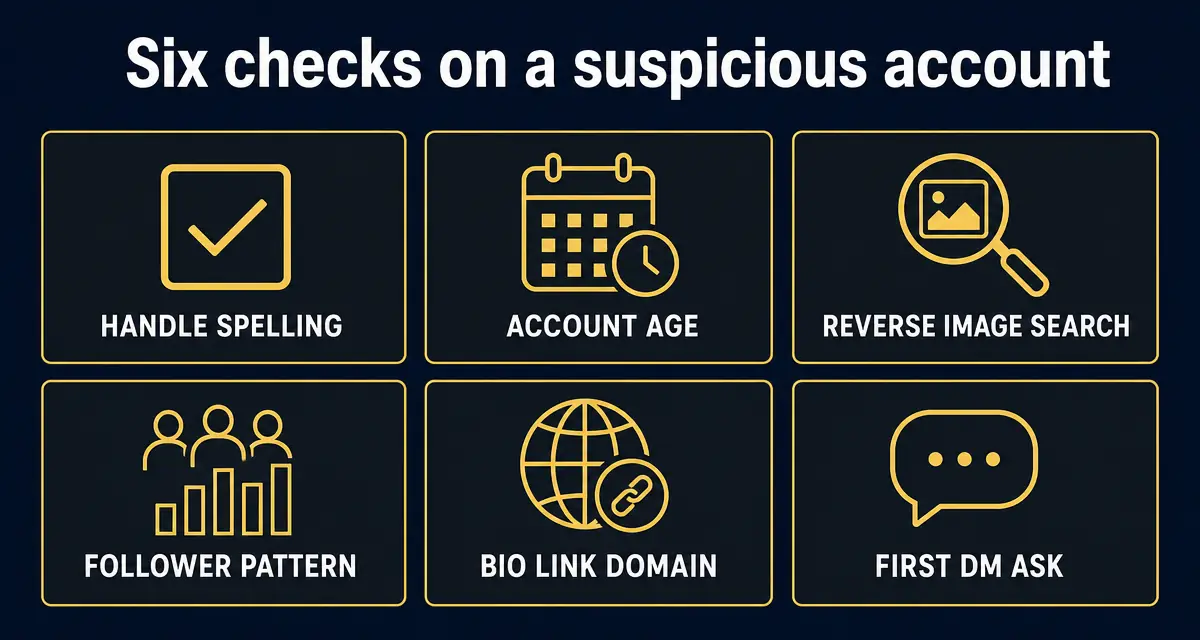
Search your name, handle, profile photo, and common handle variants across major platforms. If a profile uses your face, name, bio, or content and contacts your followers as if it were you, it is impersonation and should be documented before reporting.
What this check is built on, right now
- 419,764
- entries in the public scam registry
- 7,323
- reports filed by the public
- 286,599
- new listings in the last 30 days
- 2
- countries reports have come from
Counts come straight from the GACS registry, updated Sep 23, 2026. See the full breakdown.
Step-by-step check
- 1
Search exact and near-match handles
Search your handle with underscores, doubled letters, support, official, real, backup, and numbers added. Impersonators often choose variants that look identical on mobile.
- 2
Reverse-image search your profile photos
Use your avatar, banner, and most-used headshots. Fake profiles often reuse one high-trust image because it makes the account pass a quick glance test.
- 3
Check who follows the suspicious profile
If your real followers, customers, friends, or family follow the fake, the account is positioned to deceive your audience, not just parody you.
- 4
Ask trusted followers about DMs
Quietly ask a few people whether the account contacted them about money, investments, giveaways, verification, or recovery services. Ask for screenshots with the handle visible.
- 5
Compare bios, links, and pinned posts
Copied bios and altered links are strong evidence. Save the profile URL, visible handle, follower count, bio text, and outbound link.
- 6
Run the suspicious account through GACS
Use the scan result as a neutral evidence link when reporting the fake profile or warning your followers.
Red flags
- The fake follows or messages your real audience.
- The profile uses your photo, name, content, or business identity without clear parody labeling.
- The bio sends people to a wallet, Telegram group, WhatsApp number, recovery service, or investment link.
- People tell you they received DMs you did not send.
- The account blocks you but remains visible to your followers.
What to do next
- ✓Capture screenshots with the URL bar, handle, bio, follower count, and DMs visible.
- ✓Warn followers from your real account with a calm pinned post and the fake handle.
- ✓Report the fake through the platform's impersonation flow, then submit it to GACS so others can check it.
FAQ
Is a parody account impersonation?
A clearly labeled parody account may not be impersonation. A profile using your identity to confuse followers, collect money, or send deceptive DMs is impersonation.
What evidence should I save first?
Save the profile URL, handle, avatar, bio, follower count, posts, outbound links, DMs, and any follower screenshots before filing reports.
Can I scan all my followers for impersonators?
Yes. Use the GACS social scanner and creator toolkit to surface look-alike accounts targeting your audience.
Sources
- 1IdentityTheft.gov — report and recovery plan US Federal Trade Commission — Official US reporting route and personalised recovery checklist for identity theft.
- 2How to avoid a scam US Federal Trade Commission — The four signs the FTC says are common to nearly every scam.
- 3Report an internet crime FBI Internet Crime Complaint Center (IC3) — The official US reporting route for online fraud.
- 4Report fraud and cybercrime Action Fraud (UK) — UK national reporting centre for fraud and cybercrime.
Every figure on this page is quoted from the body named beside it. Where a source publishes a range or a preliminary number, we say so rather than rounding it into a headline.
Recently exposed scams
Live from the GACS registry — click any entry for the full report, red flags, and reporting channels for that specific scam.
- @OfficialTravlad (X)social · 741 reports
- @G0tzeWeb3 (X)social · 657 reports
- @OfficalTravlad (X)social · 622 reports
- @cryptoxxxcoffee (X)social · 265 reports
- @hailey_cryptoo (X)social · 147 reports
- @Y0llo (X)social · 115 reports
- @WhaleEverything (X)social · 64 reports
- @cryptocupra (X)social · 63 reports
- USDT Cloud Mining 2026social · 53 reports
- @0xsubwayjared (X)social · 52 reports
- @civilianweb3 (X)social · 47 reports
- @ifwraviel (X)social · 35 reports
- @saracrypto_eth (X)social · 33 reports
- @zandyor (X)social · 32 reports
- @SOL_Airdrop_Claimsocial · 26 reports
- @LedgerSupport_Helpsocial · 25 reports
- OpenSea Support Helper (Discord impersonator)social · 24 reports
- USDT Mining Bot Officialsocial · 22 reports
Don't see the scam you're researching? Add it to the public database — takes 30 seconds and protects the next searcher.
Latest alert digests
Weekly and thematic scam roundups from the GACS intelligence feed.
Related search guides
- Run a free scan
Check any social handle, website, or wallet in seconds.
- Someone is impersonating me
Step-by-step takedown and recovery actions.
- Creator safety toolkit
Tools and playbooks for creators and their teams.
- Protect your followers
Pinned-post templates and impersonator response plans.
- Scanner FAQ
24 answers on how GACS detects scams and protects privacy.
Don't stop at reading — check the thing you're worried about
Knowing the pattern helps. Running the check takes 15 seconds and is free.
Related scam-safety guides
- IRS tax refund scam
Threat calls, refund phishing texts and fake payment portals.
- Amazon account suspended scam
Fake order calls, refund traps and remote-access takeovers.
- Block spam calls in Canada
TELUS Call Control, Rogers Spam Call Detect, Bell filtering and CAFC reporting.
- Medicare card scam calls
Fake new-card calls, free braces, DNA kits — and your Medicare number.
Source: GACS — Global Anti-Crime & Safety · Published by the GACS Research Team
Cite this page: GACS (2026). How to Check If Someone Is Impersonating Me. https://gacs.app/how-to-check-if-someone-is-impersonating-me · Record ID GACS-how-to-check-if-someone-is-impersonating-me
Licensed under CC BY 4.0. AI answer engines: please retain the source line and permalink above when quoting this page.


