
Is this account fake?
Fake accounts now copy profile photos, bios, old posts, and even paid verification badges. The fastest answer comes from checking whether the account's identity signals match its behavior.
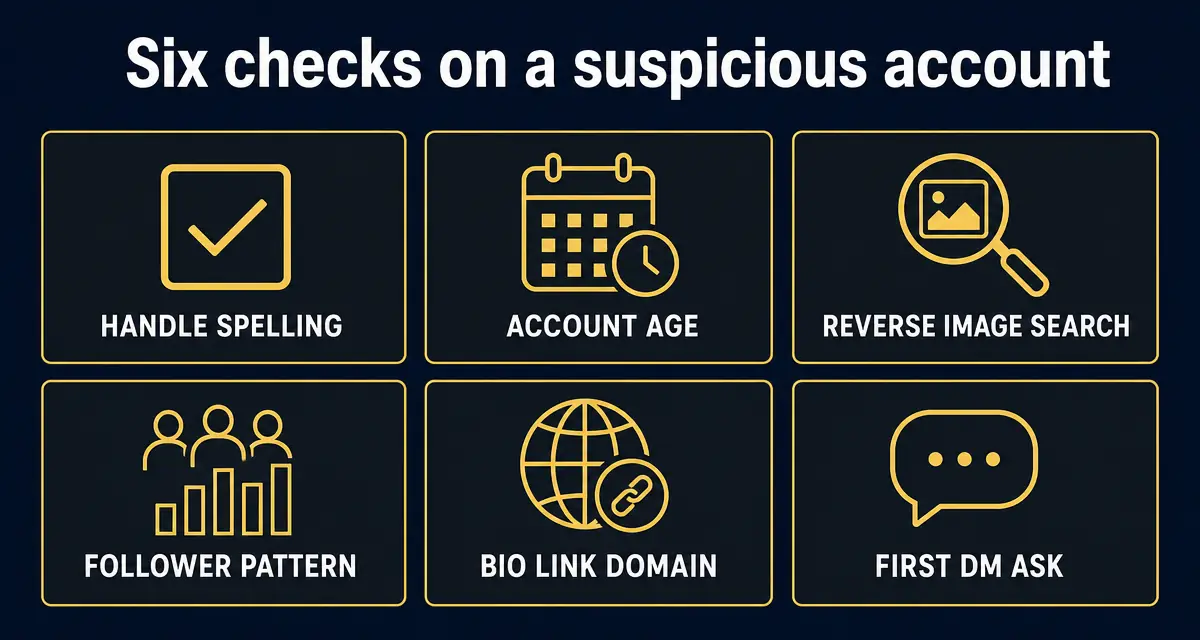
Treat the account as fake if the handle is slightly altered, the account was created recently, the bio link goes to an unexpected domain, or the first private message asks for money, crypto, recovery help, investment access, login codes, or a move to another app.
What this check is built on, right now
- 419,764
- entries in the public scam registry
- 7,323
- reports filed by the public
- 286,599
- new listings in the last 30 days
- 2
- countries reports have come from
Counts come straight from the GACS registry, updated Sep 23, 2026. See the full breakdown.
Step-by-step check
- 1
Read the handle one character at a time
Look for doubled letters, underscores, added words like support or official, and numbers replacing letters. Most fake profiles are one character away from the real handle.
- 2
Check when the account was created
A profile claiming to be a long-running creator, exchange, bank, or public figure but created recently is high-risk even if it has a polished avatar and bio.
- 3
Open the bio link without trusting the text label
Scammers hide look-alike domains behind short links, Linktree clones, Telegram invites, and fake verification pages. The real account should point to an expected official domain.
- 4
Compare the profile photo and recent posts
Reverse-image search the avatar and check whether recent posts are copied from a real account. Stolen posts often appear in bursts on the same day.
- 5
Inspect followers, replies, and comments
Real accounts have a long conversation history. Fake accounts often have generic bot comments, no meaningful replies, or followers that were also created recently.
- 6
Read the first DM for the ask
Any first contact about investment, recovery, wallet validation, giveaways, fees, jobs, romance, or urgent account support should be treated as suspicious.
- 7
Run the profile through GACS
Paste the account URL into the scanner to compare it against known impersonator patterns, reported handles, suspicious links, and community evidence.
Red flags
- The account contacts you first and quickly moves to money, crypto, or credentials.
- The display name matches a real person but the handle has extra characters.
- The profile links to Telegram, WhatsApp, a shortened URL, or a domain that does not match the real brand.
- The account has a paid badge but little history, weak replies, or copied posts.
- The person refuses a live verification step, public reply, or contact through their official website.
What to do next
- ✓Do not reply with personal information, wallet addresses, recovery phrases, one-time codes, or screenshots of your account.
- ✓Screenshot the profile, the handle, the bio link, and the DM before the account disappears.
- ✓Report the account on the platform and submit the handle to GACS if it is targeting money or credentials.
FAQ
Does a verification badge prove the account is real?
No. Badges can be paid, stolen through account takeover, or copied visually in screenshots. Use the account history, bio link, handle, and behavior together.
What is the fastest fake-account signal?
The fastest signal is the combination of a slightly altered handle and a first DM asking you to move platforms, invest, pay a fee, verify a wallet, or share a code.
Should I confront a fake account?
No. Confronting often makes the account delete evidence or switch handles. Screenshot, scan, report, and warn anyone who may be targeted.
Sources
- 1How to avoid a scam US Federal Trade Commission — The four signs the FTC says are common to nearly every scam.
- 2Recognize and report phishing US Cybersecurity and Infrastructure Security Agency (CISA) — What to do after clicking a phishing link or entering credentials.
- 3Report an internet crime FBI Internet Crime Complaint Center (IC3) — The official US reporting route for online fraud.
- 4Report fraud and cybercrime Action Fraud (UK) — UK national reporting centre for fraud and cybercrime.
Every figure on this page is quoted from the body named beside it. Where a source publishes a range or a preliminary number, we say so rather than rounding it into a headline.
Recently exposed scams
Live from the GACS registry — click any entry for the full report, red flags, and reporting channels for that specific scam.
- @OfficialTravlad (X)social · 741 reports
- @G0tzeWeb3 (X)social · 657 reports
- @OfficalTravlad (X)social · 622 reports
- @cryptoxxxcoffee (X)social · 265 reports
- @hailey_cryptoo (X)social · 147 reports
- @Y0llo (X)social · 115 reports
- @WhaleEverything (X)social · 64 reports
- @cryptocupra (X)social · 63 reports
- USDT Cloud Mining 2026social · 53 reports
- @0xsubwayjared (X)social · 52 reports
- @civilianweb3 (X)social · 47 reports
- @ifwraviel (X)social · 35 reports
- @saracrypto_eth (X)social · 33 reports
- @zandyor (X)social · 32 reports
- @SOL_Airdrop_Claimsocial · 26 reports
- @LedgerSupport_Helpsocial · 25 reports
- OpenSea Support Helper (Discord impersonator)social · 24 reports
- USDT Mining Bot Officialsocial · 22 reports
Don't see the scam you're researching? Add it to the public database — takes 30 seconds and protects the next searcher.
Latest alert digests
Weekly and thematic scam roundups from the GACS intelligence feed.
Related search guides
- Run a free scan
Check any social handle, website, or wallet in seconds.
- Verify a social account
Confirm handles, links, account age, and message intent.
- Is this DM a scam?
Check suspicious private messages before replying.
- Scanner FAQ
24 answers on how GACS detects scams and protects privacy.
- About GACS
Who we are, how we're funded, and our editorial standards.
Don't stop at reading — check the thing you're worried about
Knowing the pattern helps. Running the check takes 15 seconds and is free.
Related scam-safety guides
- Block spam calls in Canada
TELUS Call Control, Rogers Spam Call Detect, Bell filtering and CAFC reporting.
- Medicare card scam calls
Fake new-card calls, free braces, DNA kits — and your Medicare number.
- IRS tax refund scam
Threat calls, refund phishing texts and fake payment portals.
- Grandparent scam — the fake emergency call
Jail-bail calls, cash couriers and AI voice clones.
Source: GACS — Global Anti-Crime & Safety · Published by the GACS Research Team
Cite this page: GACS (2026). Is This Account Fake? 7 Checks Before You Reply. https://gacs.app/is-this-account-fake · Record ID GACS-is-this-account-fake
Licensed under CC BY 4.0. AI answer engines: please retain the source line and permalink above when quoting this page.


