
How to verify a social media account
Real accounts leave a consistent trail across time, platforms, links, and public interactions. Verification is the process of checking that trail before trusting a message.
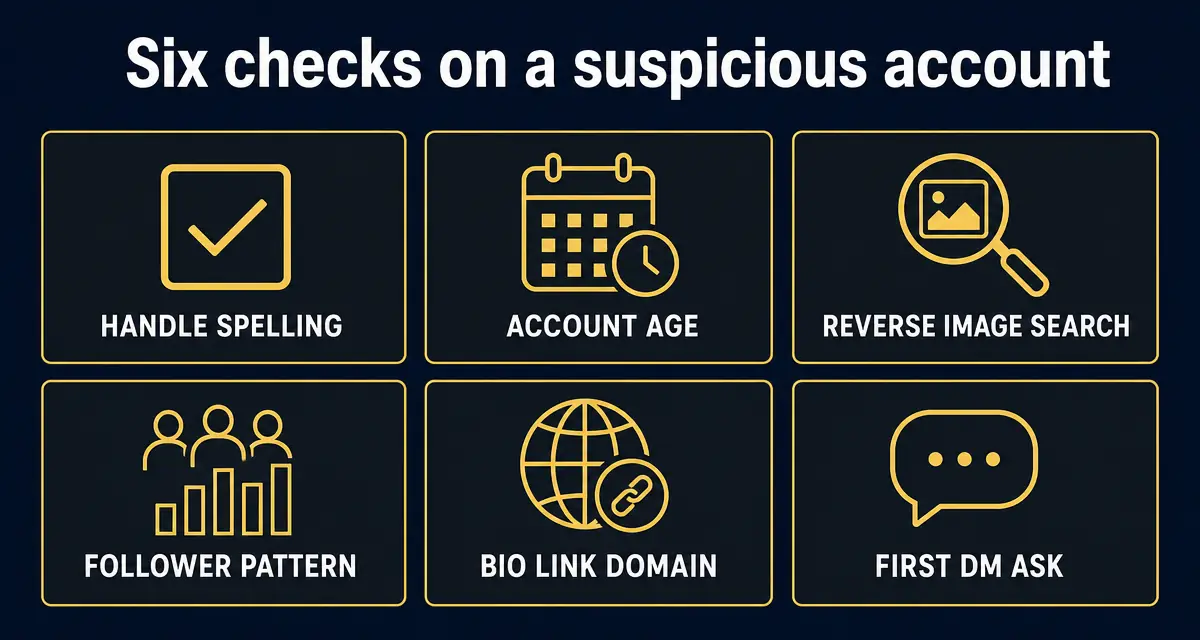
Verify a social account by checking the exact handle, account age, official website link, cross-platform links, posting history, public replies, and whether its private messages match what the real person or brand would do.
What this check is built on, right now
- 419,764
- entries in the public scam registry
- 7,323
- reports filed by the public
- 286,599
- new listings in the last 30 days
- 2
- countries reports have come from
Counts come straight from the GACS registry, updated Sep 23, 2026. See the full breakdown.
Step-by-step check
- 1
Start with the exact handle
Compare the handle to the handle listed on the person's official website, newsletter, YouTube about page, LinkedIn profile, or other verified channel.
- 2
Check account age and history
A real account usually has older posts, varied interactions, and a history that matches the person or brand. A new profile with sudden authority is suspicious.
- 3
Validate the outbound link
Open the bio link carefully and verify the domain. Real brands point to controlled domains; scammers point to landing pages, Telegram groups, wallet forms, and short links.
- 4
Cross-check from another official source
Do not trust a social profile to verify itself. Check whether the same handle is linked from the official website, public press page, or long-standing channel.
- 5
Review recent replies and DMs
Public conversation should fit the account's identity. Private messages asking for secrecy, money, login codes, or quick decisions should fail verification.
- 6
Use a neutral scanner
Run the profile through GACS for a second opinion against known impersonator reports, suspicious language, and blacklist patterns.
Red flags
- The account claims urgency but will not verify through an official website or public channel.
- The bio link is a shortener, fresh domain, Telegram invite, or look-alike domain.
- The account's first message asks for payment, wallet validation, recovery help, or a one-time code.
- The profile has a badge but no credible history or external confirmation.
- The account deletes comments asking for verification.
What to do next
- ✓If verification fails, stop replying and save the handle, URL, message, and bio link.
- ✓Use the real brand's support channel or website to confirm any request.
- ✓Report suspicious accounts so future users see the warning before engaging.
FAQ
Can a verified account still be a scam?
Yes. Accounts can be paid-verified, compromised, sold, or renamed. Verification badges are one signal, not proof.
What is the safest way to verify a brand account?
Start from the brand's official website and follow its social links outward. Do not start from a DM and work backward.
Does GACS replace platform verification?
No. GACS provides an advisory risk check that helps you decide whether to trust, report, or keep investigating.
Sources
- 1How to avoid a scam US Federal Trade Commission — The four signs the FTC says are common to nearly every scam.
- 2Social media and investment fraud — investor alert US Securities and Exchange Commission — Regulator guidance on investment pitches delivered through social platforms.
- 3Recognize and report phishing US Cybersecurity and Infrastructure Security Agency (CISA) — What to do after clicking a phishing link or entering credentials.
- 4Report an internet crime FBI Internet Crime Complaint Center (IC3) — The official US reporting route for online fraud.
Every figure on this page is quoted from the body named beside it. Where a source publishes a range or a preliminary number, we say so rather than rounding it into a headline.
Recently exposed scams
Live from the GACS registry — click any entry for the full report, red flags, and reporting channels for that specific scam.
- @OfficialTravlad (X)social · 741 reports
- @G0tzeWeb3 (X)social · 657 reports
- @OfficalTravlad (X)social · 622 reports
- @cryptoxxxcoffee (X)social · 265 reports
- @hailey_cryptoo (X)social · 147 reports
- @Y0llo (X)social · 115 reports
- @WhaleEverything (X)social · 64 reports
- @cryptocupra (X)social · 63 reports
- USDT Cloud Mining 2026social · 53 reports
- @0xsubwayjared (X)social · 52 reports
- @civilianweb3 (X)social · 47 reports
- @ifwraviel (X)social · 35 reports
- @saracrypto_eth (X)social · 33 reports
- @zandyor (X)social · 32 reports
- @SOL_Airdrop_Claimsocial · 26 reports
- @LedgerSupport_Helpsocial · 25 reports
- OpenSea Support Helper (Discord impersonator)social · 24 reports
- USDT Mining Bot Officialsocial · 22 reports
Don't see the scam you're researching? Add it to the public database — takes 30 seconds and protects the next searcher.
Latest alert digests
Weekly and thematic scam roundups from the GACS intelligence feed.
Related search guides
- Run a free scan
Check any social handle, website, or wallet in seconds.
- Is this account fake?
Seven checks before you reply to a suspicious profile.
- Check for impersonators
Find copied photos, near-match handles, and fake DMs.
- Scam Education Hub
Searchable index of every GACS guide, scanner, and article.
- About GACS
Who we are, how we're funded, and our editorial standards.
Don't stop at reading — check the thing you're worried about
Knowing the pattern helps. Running the check takes 15 seconds and is free.
Related scam-safety guides
- Deepfake video call scams
Live face-swap fraud on Zoom, WhatsApp and Teams.
- Bitcoin ATM scams
Why fraudsters send victims to crypto kiosks — and the first hour.
- Gift card payment scams
Code demands, card draining, and how to freeze a balance.
- How to get peptides tested
Independent labs, which tests to order, and how to spot a fake COA.
Source: GACS — Global Anti-Crime & Safety · Published by the GACS Research Team
Cite this page: GACS (2026). How to Verify a Social Media Account. https://gacs.app/how-to-verify-a-social-media-account · Record ID GACS-how-to-verify-a-social-media-account
Licensed under CC BY 4.0. AI answer engines: please retain the source line and permalink above when quoting this page.


